
Download Game Generator – AI Game Assets Generator, Free & Secure Tool
Overview
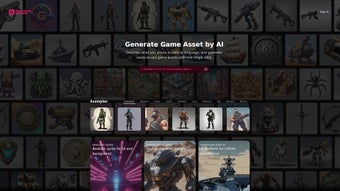
Game Generator is a cutting‑edge AI‑driven web app that turns simple text prompts into fully‑rendered game assets. Developed by the team behind game‑generator, this platform empowers indie developers, hobbyists, and even seasoned studios to create high‑quality illustrations, character sprites, UI elements, and environmental graphics without ever opening a traditional graphics editor. By describing the desired asset in natural language—think “a futuristic knight wielding a neon sword” or “a 2‑pixel‑wide health bar in pastel colors”—the AI instantly produces a polished image ready for immediate integration into Unity, Unreal, Godot, or any other engine.
The service emphasizes speed, stability, and ease of use: a single click launches the generation process, and within seconds you receive a downloadable PNG, SVG, or layered PSD file, depending on your preferences. The underlying model has been trained on thousands of game‑specific art styles, ensuring that the output not only looks good but also matches the aesthetic conventions of popular genres—from pixel‑art platformers to high‑poly RPG characters. Game Generator’s mission is to remove the bottleneck of asset creation, letting developers focus on gameplay mechanics, story, and community building while the AI handles the visual grunt work.
Its web‑based nature means there’s no need for bulky installations; all you need is a modern browser and an internet connection. Whether you’re prototyping a new mechanic or polishing a launch‑ready title, Game Generator offers a secure, free‑to‑try solution that scales with the ambition of your project.
Key Features
- Natural‑Language Prompting: Write plain English descriptions and receive accurate visual representations.
- Multiple Output Formats: Download assets as PNG, SVG, or layered PSD for maximum flexibility.
- Style Libraries: Choose from preset art styles—pixel art, hand‑drawn, low‑poly, sci‑fi, fantasy, and more.
- Real‑Time Preview: Watch the AI iterate in seconds, allowing quick tweaks before finalizing.
- Batch Generation: Upload a CSV of prompts to generate whole asset packs in one go.
- Version Control Integration: Export directly to GitHub or GitLab repositories for seamless workflow.
- Secure Cloud Processing: All generation occurs on encrypted servers; no local files are stored without your consent.
- Free Tier & Affordable Upgrades: Unlimited low‑resolution renders for free; premium plans unlock high‑resolution and commercial licensing.
- Cross‑Platform Compatibility: Works on Windows, macOS, Linux, Android, and iOS browsers.
- Community Marketplace: Share and sell your AI‑generated assets with other developers.
Each of these features has been designed with the modern game developer in mind. The natural‑language prompting removes the learning curve associated with traditional asset pipelines, while the style libraries guarantee that the generated art can blend seamlessly with existing projects. Real‑time preview and batch generation dramatically cut down iteration time, allowing teams to experiment with dozens of concepts in the span of a coffee break.
For studios that rely on version control, the direct export option eliminates the tedious step of manually uploading assets, reducing the chance of human error. Security is a top priority; all data transfers are encrypted with TLS 1.3, and the service adheres to GDPR standards, ensuring that your proprietary ideas remain confidential. Whether you’re a solo creator looking for a quick sprite or a mid‑size studio needing a full set of UI icons, Game Generator scales to meet those needs without compromising on quality or speed.
Installation, Usage & Compatibility
Getting Started – No Installation Required
Because Game Generator is a web‑based application, there is absolutely no software to download or install on your local machine. Simply navigate to the official website, create a free account, and you’re ready to generate assets. The platform runs on the latest versions of Chrome, Edge, Firefox, and Safari, ensuring a smooth experience across desktop and mobile devices. For developers who prefer a dedicated desktop shortcut, you can add the site to your browser’s “apps” section, which opens it in a minimal window, mimicking a native application.
Step‑by‑Step Workflow
1. Log In: Use your email or single‑sign‑on (Google, GitHub) to access the dashboard.
2. Create a Prompt: Type a clear description of the asset you need.
Include style tags if you want a specific look (e.g., “pixel art” or “low‑poly”).
3. Select Output Settings: Choose resolution (512×512, 1024×1024), format (PNG, SVG, PSD), and any post‑processing options like background removal.
4. Generate: Click the “Generate” button.
The AI processes your request in the cloud and returns a preview within 2‑5 seconds.
5. Refine: Use the “Regenerate” or “Edit Prompt” options to tweak the result until it meets your expectations.
6. Download & Integrate: Once satisfied, download the asset and import it directly into your game engine.
Supported Operating Systems
Game Generator is compatible with any operating system that supports a modern web browser. This includes:
- Windows 10 and later
- macOS Catalina (10.15) and later
- Linux distributions with recent Chromium/Firefox builds
- Android 9 (Pie) and later browsers
- iOS 13 and later Safari
Because the heavy lifting is performed on secure cloud servers, the performance of your local device has little impact on generation speed. Even older laptops can produce high‑quality assets quickly, provided they have a stable internet connection.
Pros, Cons & Frequently Asked Questions
Pros
- Instant asset creation with just one click.
- No steep learning curve—natural language prompts are all you need.
- Free tier offers unlimited low‑resolution renders.
- High‑resolution, commercial‑ready assets available on affordable plans.
- Secure, GDPR‑compliant cloud processing.
- Wide range of export formats for seamless engine integration.
- Cross‑platform accessibility via any modern browser.
- Batch generation saves time for large projects.
- Community marketplace encourages asset sharing and monetization.
- Direct export to version‑control systems streamlines workflow.
Cons
- Requires an internet connection; offline use is not possible.
- High‑resolution assets are limited to paid subscriptions.
- AI may occasionally misinterpret ambiguous prompts, requiring refinement.
- Complex animations are not yet supported—focus is on static assets.
- While GDPR‑compliant, some studios may prefer on‑premise solutions for IP security.
FAQ
Can I use the generated assets in commercial games?
Yes. All assets produced under a paid subscription come with a commercial license that allows you to sell games, publish on app stores, and monetize without additional royalties.
What file formats are available for download?
You can download assets as PNG (transparent background), SVG (scalable vector), or layered PSD files. The format you choose depends on your workflow and the resolution you need.
Is there a limit to how many assets I can generate per day?
The free tier allows unlimited low‑resolution renders, but there is a soft cap of 100 prompts per day to ensure fair usage. Paid plans remove this limit and provide priority processing.
Conclusion & Call to Action
Game Generator bridges the gap between imagination and implementation, offering a fast, secure, and affordable way to populate your game world with professional‑grade assets. By leveraging AI, the platform removes the repetitive grind of manual illustration, freeing developers to concentrate on core gameplay and storytelling. Whether you’re prototyping a new mechanic, polishing an indie title, or scaling a mid‑size studio’s art pipeline, Game Generator’s flexible pricing, cross‑platform accessibility, and robust feature set make it a compelling addition to any development toolkit. Ready to accelerate your game creation process? Sign up for a free account today, generate your first asset in seconds, and experience how AI can transform your workflow.



.png)



